For iPhone, iPad, Mac & Apple Watch

Keep your battery young. Keep your iPhone worth more.

Heat permanently wears down a battery. Sabja is an iPhone heat monitor that reads Apple’s Thermal State, which rises when heavy apps, charging, or a hot room put your iPhone under thermal pressure, and tells you when a short break will help, so your iPhone keeps more of its battery health, its speed, and its value when you upgrade.

NominalFairSeriousCritical
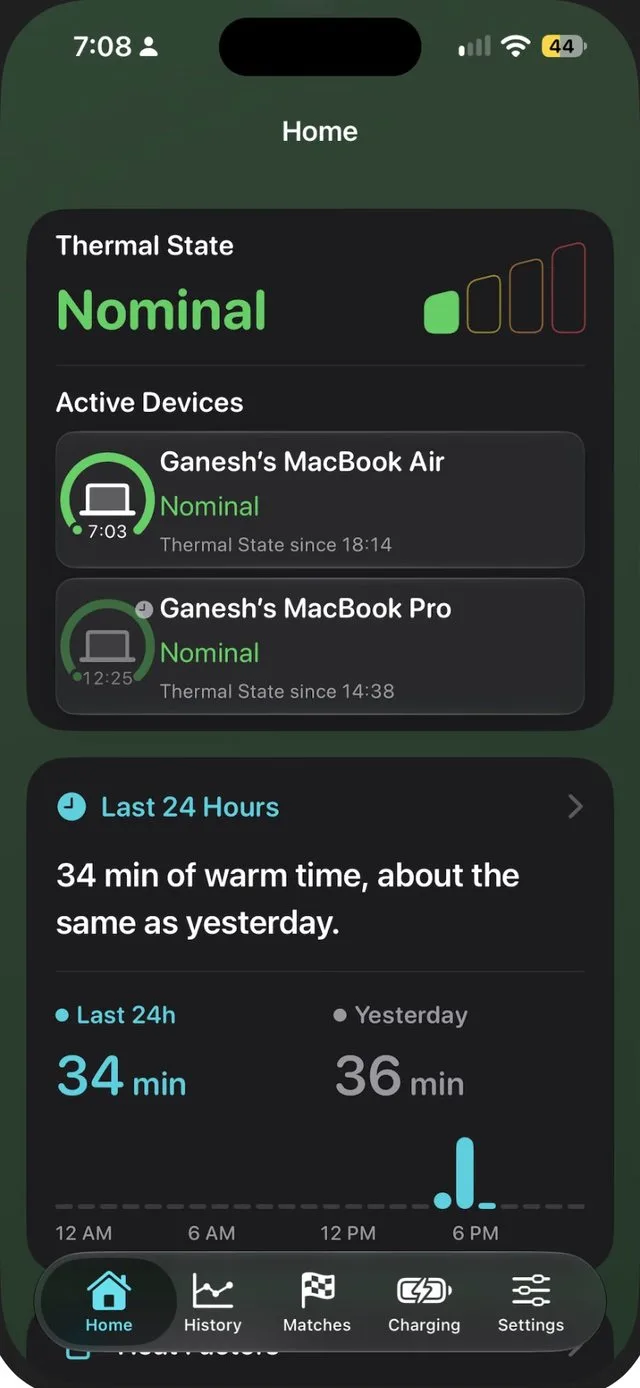
Sabja Home on iPhone showing a Nominal Thermal State, two Macs under Active Devices, and 34 minutes of warm time in the last 24 hours
Thermal StateNominal
Warm time, last 24 hours34 min · same as yesterday

Apple’s own Thermal State

No account needed

Monitoring works offline

Why I built Sabja

One number in Settings cost me ₹7,400.

₹24,600Exchange value of my iPhone 12 mini
<85%Battery Maximum Capacity at the time of exchange
₹7,400Lower offer, about 30% of its value

Anyone can see Maximum Capacity in Settings › Battery › Battery Health, including the buyer or trade-in partner pricing your phone.

When I went to exchange my iPhone 12 mini, it was valued at ₹24,600. Its battery’s Maximum Capacity had dropped below 85%, so the offer came in ₹7,400 lower.

Around the same time, my brother nearly had to replace his iPhone 13 after its battery swelled.

Heat is one of the things that wears a battery down faster, and iOS rarely tells you when it’s happening. I built Sabja so you notice it early and look after your iPhone’s battery while it still counts.

From my order: the exchange value dropped from ₹24,600 to ₹17,200.
Ganesh, maker of Sabja
What heat does to your iPhone

Heat costs you twice: right now, and permanently.

A warm iPhone protects itself by slowing down. The bigger cost is the part you can’t see: battery capacity that never comes back.

In minutes

Your iPhone holds back

When an iPhone runs past its normal operating range, Apple says you might notice:

  • Charging slows or stops, including wireless charging.
  • The display dims or goes black.
  • Cellular signal weakens as the radios enter a low-power state.
  • The camera flash or other camera features turn off for a while.
  • Games and apps run slower, with lower frame rates and longer processing times.
  • Navigation turns the screen off with “iPhone needs to cool down”.
Apple: If your iPhone gets too hot
Over months

Your battery ages faster

These changes are permanent. Every hot hour adds to the battery’s chemical age.

  • Lost capacity doesn’t come back. Apple says ambient heat above 35 °C can permanently damage battery capacity, and charging in the heat damages it further.
  • Shorter battery life every day. A battery with lower capacity runs out sooner on each charge.
  • Less peak power. As a battery chemically ages, iOS may limit peak performance to prevent unexpected shutdowns.
  • An earlier battery replacement. Apple designs iPhone 15 batteries to keep 80% capacity after 1,000 full cycles, and earlier models after 500, under ideal conditions. Heat isn’t one of them.
  • A lower resale price. Maximum Capacity is right there in Settings for every buyer to see.
Apple: Maximizing battery life and lifespan

A hotter year can cost about 15 more points of capacity. In Battery University’s estimates, a lithium-ion battery stored fully charged for one year keeps about 80% of its capacity at 25 °C, but only about 65% at 40 °C.Lab storage estimates for cobalt-based lithium-ion cells, not iPhone measurements. Source: BU-808 ↗

What you get

Less thermal stress. More of what you paid for.

A full day of battery, for more years

Fewer hot hours mean slower capacity loss, so a full charge keeps covering your day for longer.

Smooth games and steady video

Easing off at Fair helps you avoid the frame-rate drops and camera cut-outs that iOS applies when thermal pressure rises.

Charging that finishes

A cooler iPhone is less likely to have charging slowed or paused, so you leave with the charge you expected.

More money when you upgrade

A battery that holds its capacity is one less reason for a buyer to cut the price.

How Sabja helps

You don’t have to watch your iPhone’s thermal state. Sabja does.

  1. Sabja watches your Thermal State

    The app and its widgets check in through the day, using the same signal iOS uses to manage thermal pressure.

  2. You get a heads-up when it rises PRO

    A calm alert arrives when Thermal State reaches Fair, Serious, or Critical, and again when it eases.

  3. You take a short break

    Pause heavy apps, or unplug and take off the case for a few minutes. That’s usually enough.

Sabja doesn’t cool your iPhone. It tells you when a short break can help.

iPhone Lock Screen with Sabja’s ring widget and a notification saying Thermal State rises to Fair
Inside Sabja 2.0

Turn warm moments into cooler habits.

Sabja keeps a record of when your devices run warm, so the patterns that wear your battery down become easy to spot and easy to change.

History PRO

Know when your iPhone runs warm, and when it peaks.

Warm Time compares today and this week with what’s usual for you. Time of Day shows when your warm time peaks, so you can save heavy tasks for cooler hours.

  • 24-hour, 7-day, and 30-day views
  • Warm time compared with your usual
  • Daily and weekly highlights
Sabja History showing 34 minutes of warm time this week against a usual 1 hour 13 minutes, and warm time peaking between 5 PM and 8 PM
Weekly Match PRO

Make every week cooler than the last.

Weekly Match compares this week’s warm time with last week at the same point. Pick a target, follow the Live Match, and build a record of cooler weeks.

  • Last week, best week, or a custom target
  • A daily budget to stay ahead
  • Wins, draws, and streaks
Sabja Weekly Match showing 34 minutes of warm time this week against 1 hour 20 minutes last week, with a daily budget
Charging PRO

Charge without cooking the battery.

See how many of your charges got warm, how soon they warm up, and how often you charge below 20% or above 90%. The 40–90 guide helps you spend less time near empty and near full.

  • Charging Heat and Time to Warm
  • Battery Range and the 40–90 habit
  • Charging Live Activity on the Lock Screen
Sabja Charging showing that 73% of charges got warm, charges usually warm within 11 minutes, and 39 of 77 charges went below 20% or above 90%
All Devices PRO

Every device you own, at one glance.

Turn on Share Thermal State and see your iPhone, iPad, Mac, and Apple Watch together in the app and in the All Devices widget. It syncs through your private iCloud, which only your devices can read.

  • Active Devices on Home
  • All Devices widget for up to four devices
  • Opt-in, off until you turn it on
All Devices widget showing iPhone at Fair, Apple Watch at Nominal, a MacBook Pro at Serious, and an iPad at Critical All Devices widget in light mode showing an iPhone at Fair and an Apple Watch at Nominal
Widgets PRO

Check without unlocking.

Lock Screen widgets keep checking Thermal State when Sabja isn’t open, and the Weekly Match widget shows how this week compares with last week. Tap a widget to refresh it.

  • Lock Screen ring widget
  • Weekly Match and Active Match widgets
  • Home Screen and Mac desktop widgets
Weekly Match widget showing 4 hours 52 minutes of warm duration, 20 minutes less than last week, and a Fair Thermal State
One app, every device

Look after every battery you carry.

One device monitor for iPhone, iPad, Mac, and Apple Watch, with a single purchase.

Mac

Thermal State lives in your menu bar. With Sabja Pro, Active Now shows what’s keeping your Mac busy, from CPU and GPU to memory, disk, and network, with one thing to try and a shortcut to Activity Monitor.

Sabja on Mac showing a Fair Thermal State, Active Now with high CPU and GPU usage, and warm time for the last 24 hours

iPad

Home, History, Matches, and Charging, laid out for the bigger screen.

Sabja on iPad showing Thermal State, Active Devices, Active Now, and Last 24 Hours
Sabja on Apple Watch showing a Fair Thermal State and Smart Suggestions for charging and Low Power Mode

Apple Watch

Your watch’s own Thermal State at a glance, with a complication for your watch face.

Honest by design

Apple’s signal, not a made-up number.

A phone temperature checker that shows degrees is guessing: iOS doesn’t let apps read the exact temperature of your battery or processor. Sabja reads the Thermal State iOS itself uses to manage thermal pressure: Nominal, Fair, Serious, or Critical.

Core monitoring runs on your device and works offline. No account, no sign-up.

Free and Pro

Start free. Go Pro for the full picture.

Free

Everything you need to check your device right now.

  • Current Thermal State on Home
  • Heat Factors and cooling guidance
  • Works offline, no account

Sabja Pro

The habits that protect your battery over months.

  • Alerts when Thermal State rises or eases
  • History and Time of Day
  • Weekly Matches
  • Charging insights and Live Activity
  • Lock Screen and Home Screen widgets
  • All Devices through private iCloud
  • Active Now on Mac
  • Monthly, yearly, or lifetime plans
iPhone heat guides

Short answers to common heat questions.

Practical, sourced guides to what causes heat, what’s normal, and what to do next.

Browse all guides
Sabja app icon Your battery only gets one life

Catch thermal stress while it still counts.

Download Sabja free for iPhone, iPad, Mac, and Apple Watch. Check your Thermal State today, and unlock alerts, History, Matches, Charging, and widgets with Sabja Pro.

Download on theApp Store QR code for Sabja on the App Store Scan to downloadFree on the App Store